
Phillhealth
Register Online
How to create your Phillhealth account
Phillhealth
Log in Guide
Step by step login instuctions
MDR Guide
How to download your member data record
Check contributions
View payment history & status
Phillhealth
Id
Know your PIN & ID card details
Benefits & Coverage
Explore your available benefits.
Every Filipino who has tried to check a contribution, print a form, or update a record online eventually lands on one page: the PhilHealth Portal. It is the official online gateway of the Philippine Health Insurance Corporation, and it now sits at the center of almost every transaction members need to do without lining up at a branch. This guide walks you through the entire portal experience, from your first login to fixing the errors that trip up thousands of members every month.
We wrote this for people who need answers right now, not a textbook explanation of health insurance. You will find the exact steps to log in, register, recover a forgotten PIN, and understand what the portal can and cannot do for you. Along the way, we point out the mistakes that cause the most delays, so you can skip them entirely.
What Is the PhilHealth Portal and Why Do You Need It
The PhilHealth Portal is the official web-based platform where members, employers, and healthcare providers manage their PhilHealth accounts online. Through it, you can register as a new member, check your contribution history, update personal information, print your Member Data Record, and access other services without visiting a PhilHealth office in person.
Since 2024, PhilHealth has been consolidating most of its digital services under a single sign-on system, often referred to by its newer branding, PhilHealth YAKAP. This means your old Member Portal account, your PhilHealth Konsulta records, and other services are gradually being linked under one login. If you registered years ago and haven’t logged in recently, expect a slightly different interface than what you remember.
You need the portal for practical reasons. Employers require updated Member Data Records for HR files. Hospitals ask for proof of active membership before processing claims. Loan applications, visa processing, and even some job onboarding steps ask for a PhilHealth number or a printed MDR. Without portal access, each of these becomes a trip to a branch, a queue number, and a half-day wait.
Who Can Access the PhilHealth Portal
Anyone with an active PhilHealth membership can access the portal.
Your available services may vary depending on your membership type.

Employed
Members
Members whose contributions are deducted through payroll.

Self-employed Members
Members who run their own business or practice and pay their own contributions.

Voluntary Members
Members who are not required to contribute but choose to avail of PhilHealth benefits voluntarily.

Overseas Filipino Workers (OFWs)
Filipino workers abroad who are members through voluntary or employer-sponsored programs.
Senior Citizens
Members enrolled under the PhilHealth Konsulta Program through local government units.
Eligible Members
Anyone with an active PhilHealth membership can access the portal, including:
Your available services may vary depending on your membership type.
Employers
Employers use a separate Employer Portal to manage company-related transactions.
Employer services are different from the personal member portal.
Dependents
PhilHealth Dependents do not have separate portal accounts. Their information is managed under the principal member’s account.
Use your own account to:
What You Need Before You Start
A little preparation saves you from restarting the process halfway through. Before you attempt to log in or register, make sure you have the following ready.
PhilHealth Number (PIN)
Your PhilHealth Identification Number (PIN), also called your PhilHealth Number
Valid Email Address
A valid email address that you can actually access, since verification links get sent there
Registered Mobile Number
A mobile number registered under your name, for OTP verification
Government-issued ID
A government-issued ID for identity verification during registration
Stable Internet Connection
A stable internet connection, since the portal can time out on slow connections

First Time Member?
Don’t have a PhilHealth Number (PIN) yet? Follow step-by-step registration guide to learn the requirements, complete the process, and get started with confidence.
How to Log In to the PhilHealth Portal (Step-by-Step)
Logging in to the PhilHealth Portal usually takes less than five minutes once you have your credentials ready. Here is the process most members follow today.
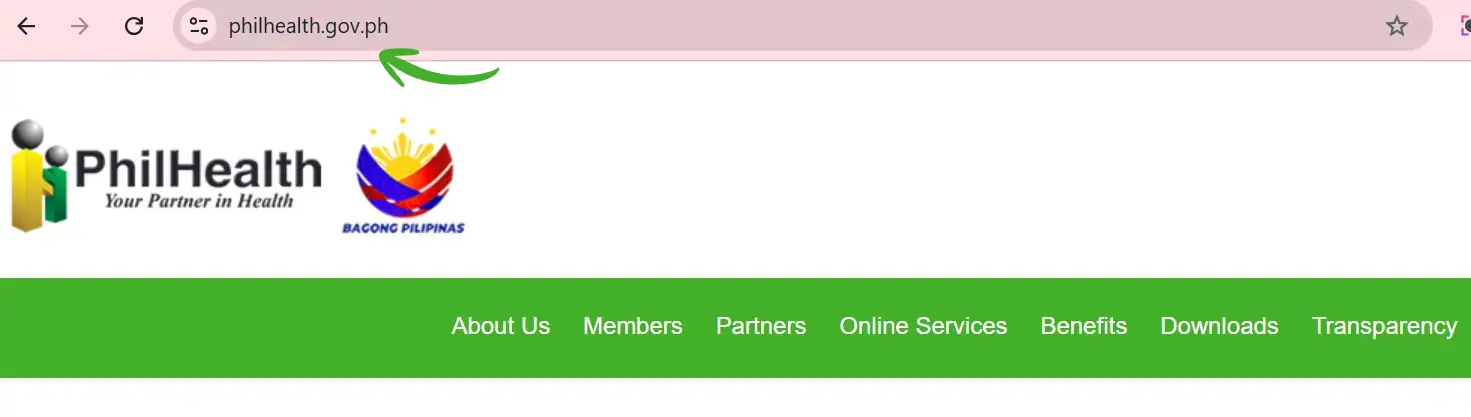
Go to the official PhilHealth website
Visit the official PhilHealth website to access the Member Portal and all online services. From here, you can register, log in, check your membership details, and manage your PhilHealth account securely.
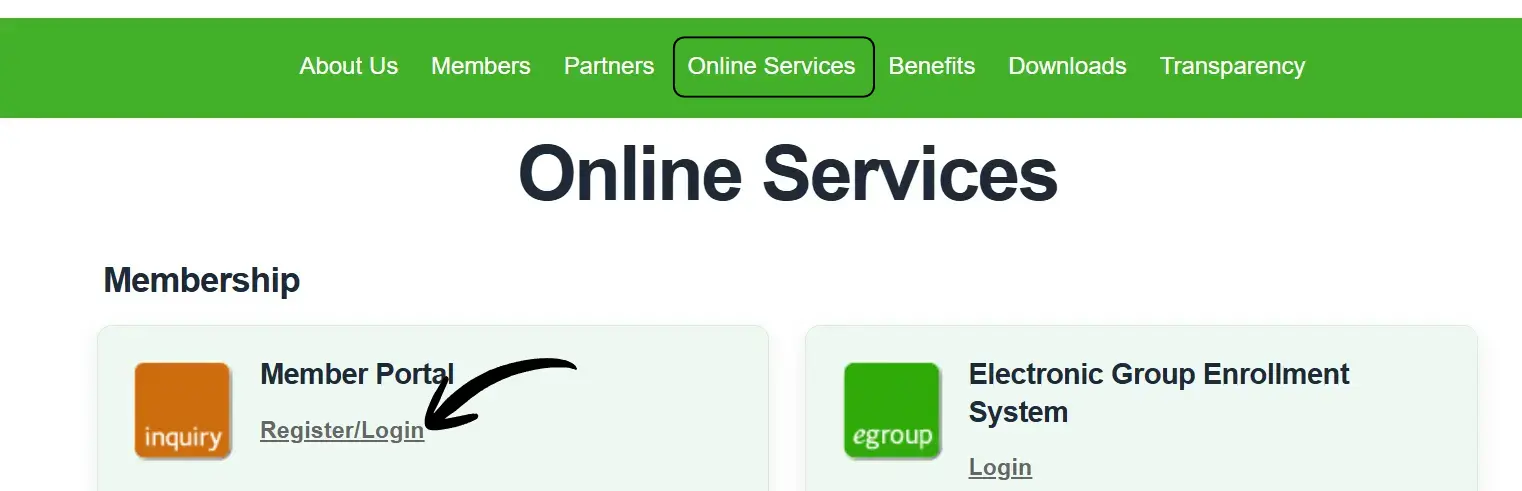
Locate the Member Portal or Log In button
This is typically found on the homepage,
sometimes labeled as “Member Login” or under the PhilHealth YAKAP section.
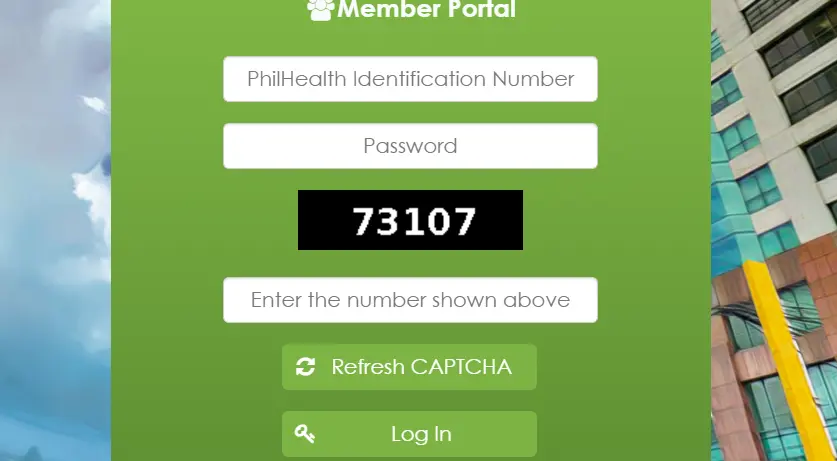
Enter your PhilHealth Number and password
If this is your first time logging in after the system migration, you may be asked to reset your password even if you had one before.
Complete the verification step
Depending on your account setup, this could be an OTP sent to your mobile number or a confirmation link sent to your registered email.

Access your dashboard
Once verified, you’ll land on your account summary, where you can view your membership status, contribution history, and available online services.
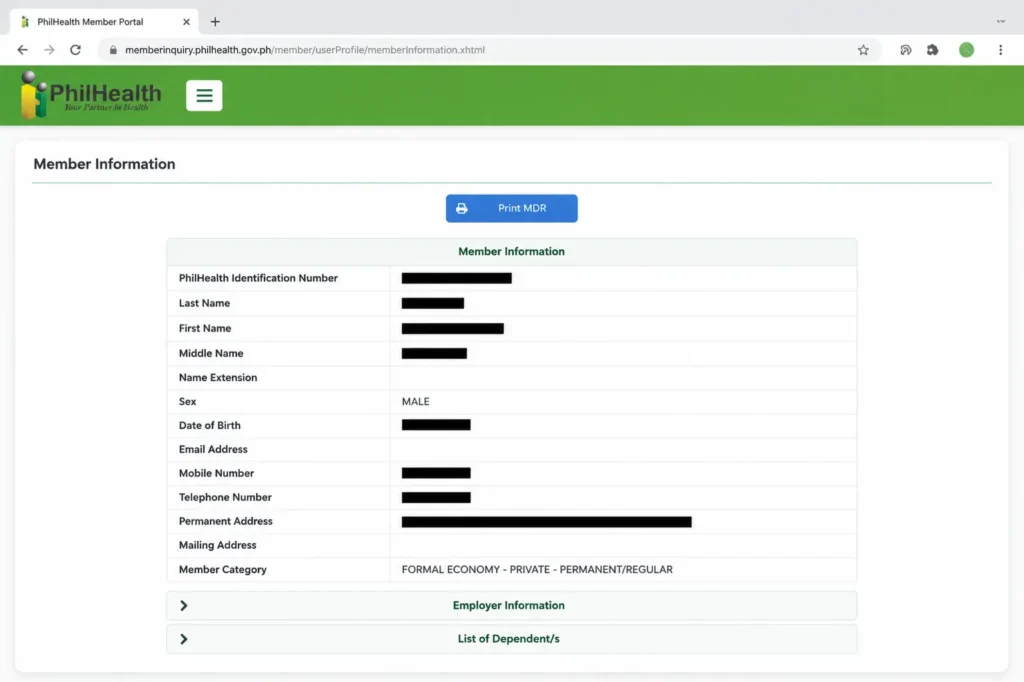
If you’re logging in for the first time on a new device, the system sometimes adds an extra security check to confirm it’s really you. This is normal and meant to protect your account, so don’t panic if it takes an extra step.
Common Login Errors and How to Fix Them
Login problems are, without question, the most common frustration members report about the PhilHealth Portal. Here are the errors that come up again and again, along with practical fixes.
Invalid PhilHealth Number or Password
This usually means one of three things: you typed the wrong PIN, your password doesn’t match what’s on record, or your account was migrated to the new system and your old password no longer works. Double-check your PIN against your physical ID or old MDR first. If the number is correct, try the “Forgot Password” option before assuming something is broken.
Account Not Found” or “No Record ExistsNumber or Password
This typically happens to members who registered a long time ago through an employer and never created an online account separately. Being an active contributor doesn’t automatically mean you have portal credentials. In this case, you need to complete the online registration process to link your existing PIN to a new portal account.
OTP Not Received
Mobile network delays, an outdated registered number, or a full inbox can all block OTP delivery. Wait at least two minutes before requesting a resend, since spamming the button often triggers a temporary lockout. If the number listed on your account is old or inactive, you’ll need to update it through customer support before OTP verification will work at all.
Page Keeps Loading or Times Out
The portal experiences heavy traffic, especially at the start and end of the month when many members check contributions or renew records at once. If a page won’t load, try again during off-peak hours, typically mid-morning on a weekday, and avoid using multiple tabs of the same session simultaneously.
Account Locked After Multiple Attempts
For security, the system locks an account after several failed login attempts within a short period. This lockout is usually temporary, lasting anywhere from thirty minutes to a few hours, but if it persists, you’ll need to reach PhilHealth’s official hotline or email support to have it manually reset.
How to Find or Recover Your PhilHealth Number (PIN)
Losing track of your PIN is more common than people admit, especially for those who registered years ago through an employer and never wrote the number down. There are a few reliable ways to recover it.

Check Old Documents
First, check old documents. Your PIN appears on your PhilHealth ID card, your Member Data Record, old payslips if you’re employed, or any prior official receipt from PhilHealth. Many people find it faster to dig through an old payslip than to go through an online recovery process.

Use The Online Recovery Tool
Second, use the portal’s number recovery tool, usually found near the login page under an option like “Forgot PIN” or “Verify Your Number.” You’ll typically need to provide your full name, birth date, and either your registered email or mobile number for the system to match your record.

Contact PhilHealth Directly
Third, contact PhilHealth directly through their official hotline or email if the online tools don’t return a match. Have your full name, birth date, and a valid ID ready, since they will verify your identity before releasing any number over the phone or through email.
Avoid asking for this information from social media pages claiming to be PhilHealth or third-party “assistance” pages, since these are common phishing setups. Official recovery only happens through the PhilHealth website or verified hotlines.
How to Register on the PhilHealth Portal for the First Time
If you’ve never had a PhilHealth account, or you have a PIN from an old employer-based enrollment but never created online credentials, here’s how the registration process generally works.

Visit the official PhilHealth registration page.
Look for an option like “Register” or “Create an Account,” separate from the login button.
Always use the official Phillhealth portal
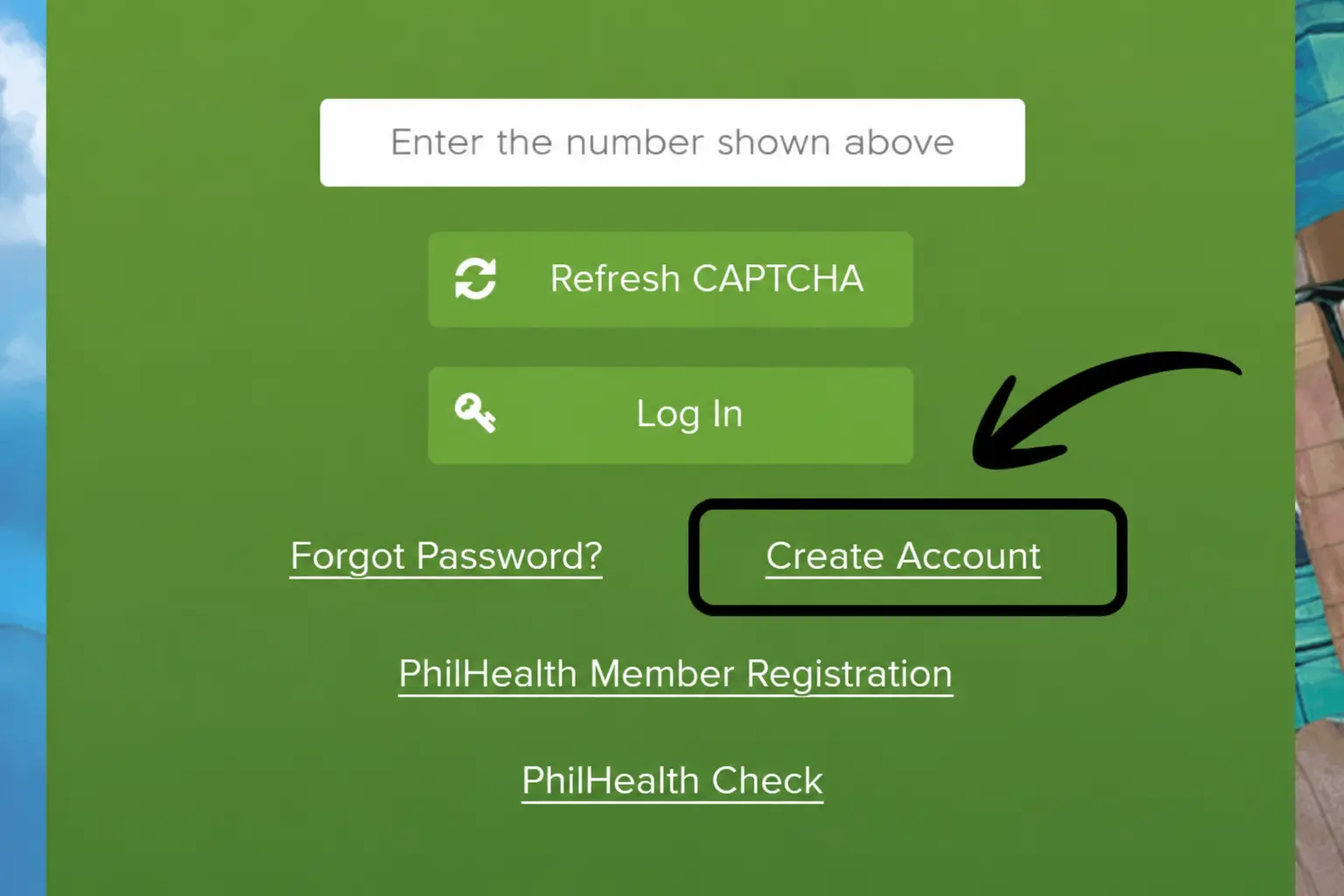
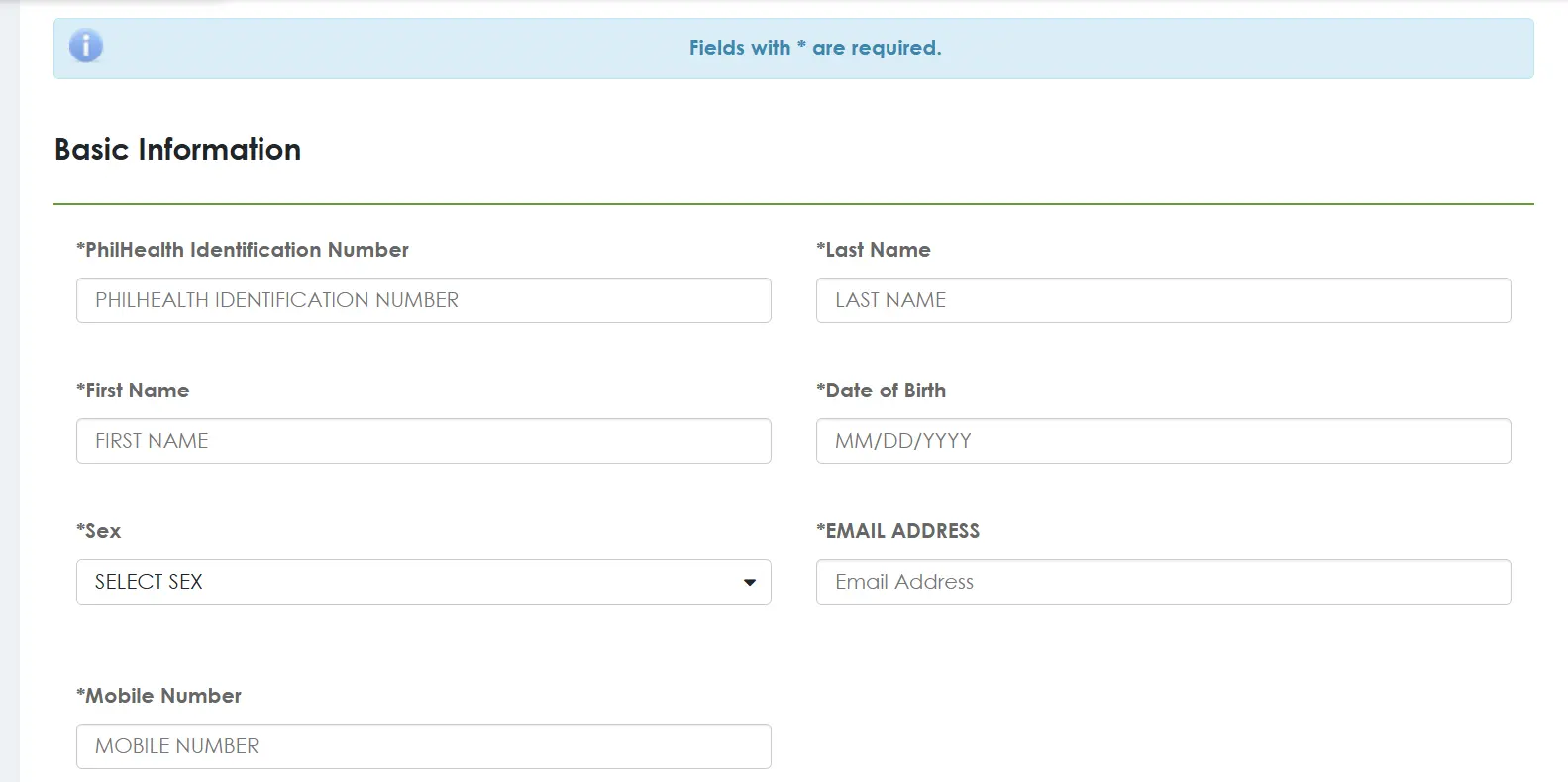
Fill out the online registration form
This asks for your basic personal details, including full name, birth date, civil status, address, and contact information.
Make sure all information is accurate and matches your
Official records.
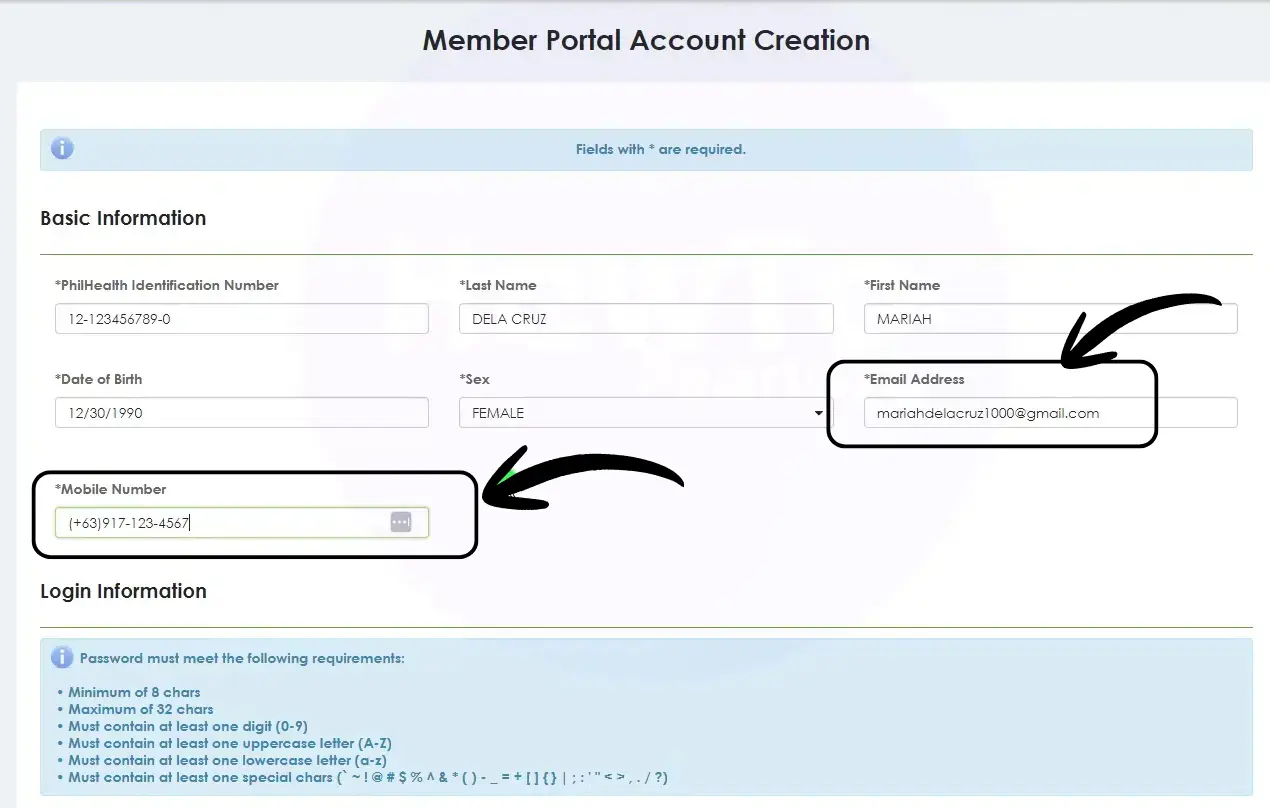
Verify your email and mobile number
The system sends confirmation links or codes to make sure your contact details are accurate.
Check your inbox and SMS for the verification code, Also
check spam or junk folders if needed.
Receive your PhilHealth Number
Once your registration is processed, your PIN gets generated or linked, and you can start using the portal fully.
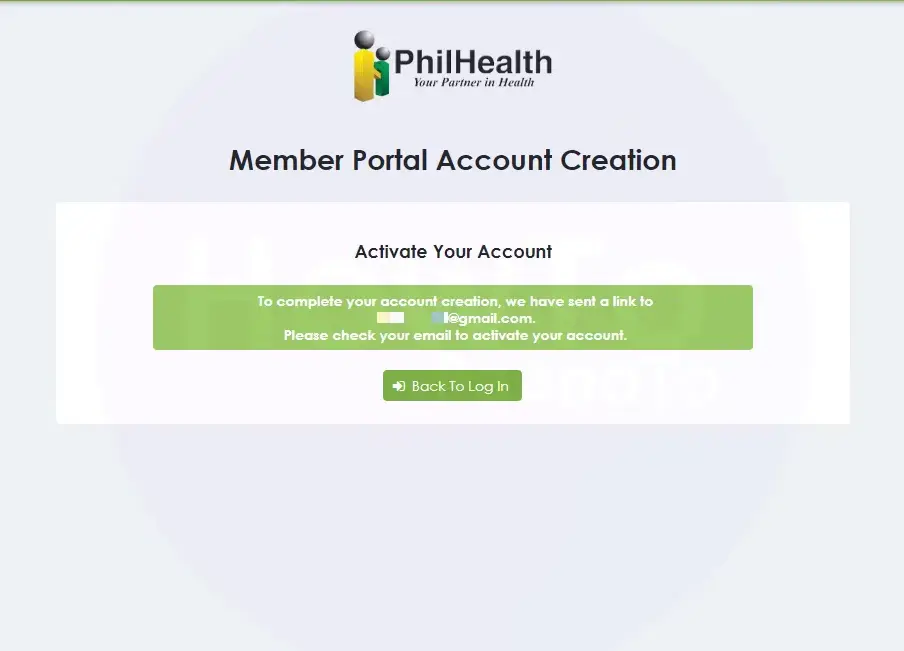
Processing time for new online registrations generally ranges from a few minutes for straightforward cases to a few business days if manual verification is needed. If you don’t receive confirmation within a week, it’s worth following up rather than assuming it went through.
What You Can Do Inside the PhilHealth Portal
Once you’re logged in, the portal opens up a fairly wide set of self-service options. Here’s what most members use it for.
Each of these deserves its own detailed walkthrough since the steps and requirements differ. If you’re specifically trying to check or Online pay your monthly contributions, that process has enough nuance, including the updated contribution table, that it’s better covered in its own article rather than squeezed in here.
What You Cannot Do Online (and Where to Go Instead)
Despite how much has moved online, a few transactions still require an in-person visit or additional processing that the portal alone can’t complete. Understanding these upfront saves you from repeated failed attempts.
Complex membership disputes, such as correcting a birth date already used for years of contributions, usually need physical document verification at a branch. Claims reimbursement for certain hospital cases may also require submitted paperwork rather than a fully online process, particularly for older claims filed before digital submission became standard.
If you need someone else to transact on your behalf, such as a family member claiming a refund or processing paperwork while you’re abroad, that typically requires a formal authorization document, a topic significant enough to deserve its own separate explanation rather than a quick summary here. If you want to file PhilHealth Claim, then you must have PhilHealth Claim Signature Form CSF and fill it to get the funds.
For situations the portal can’t resolve, locating the nearest PhilHealth branch and, where available, booking an appointment ahead of time will save considerably more time than walking in without one.
PhilHealth Portal vs PhilHealth YAKAP: What Changed
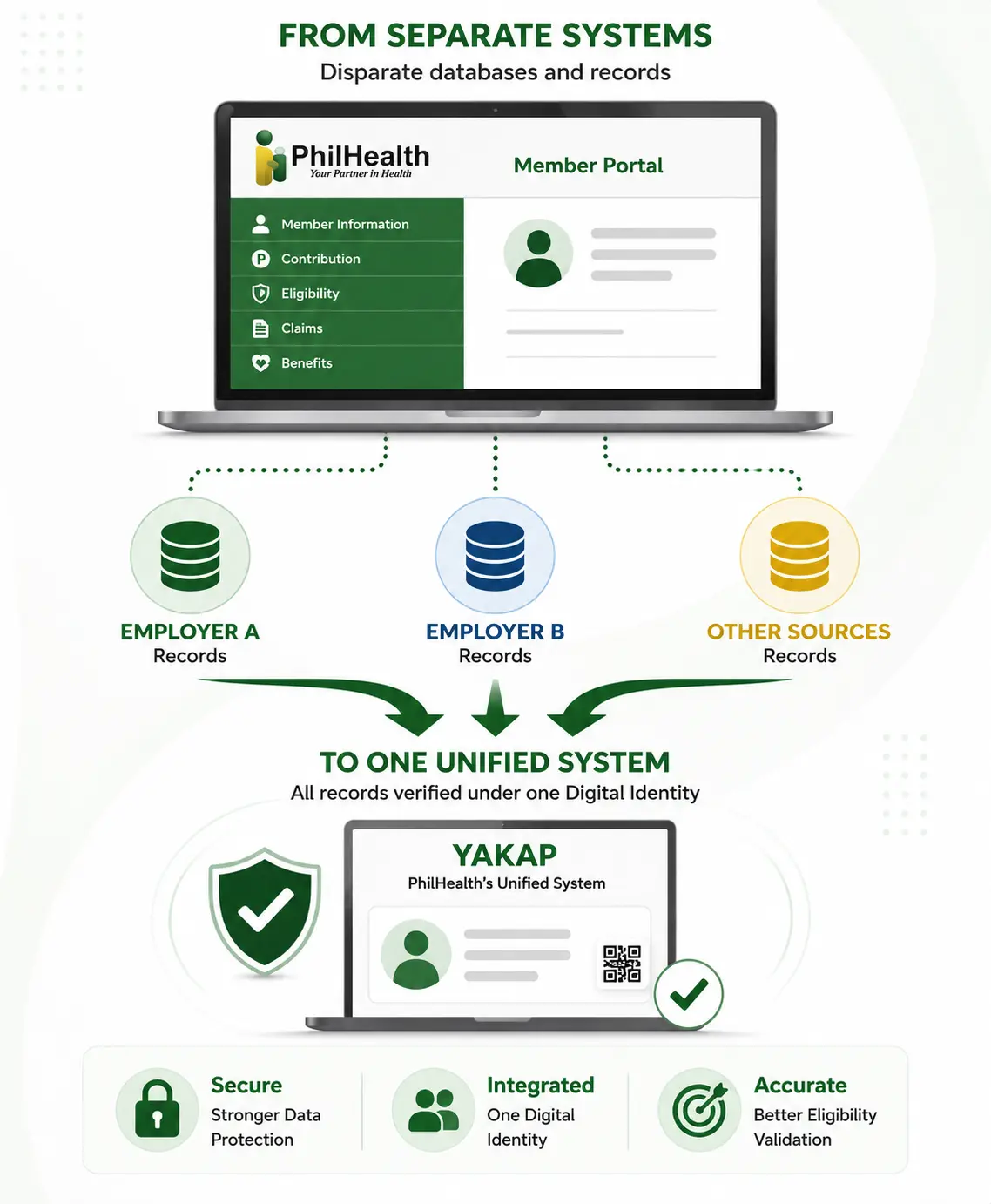
What Changed?
If you’ve used PhilHealth’s online services before and noticed a different name or interface recently, you’re not imagining it. YAKAP is PhilHealth’s newer unified system, designed to consolidate membership records, benefit eligibility ( See Z-Benefits), and healthcare provider data under a single digital identity rather than several disconnected databases.
Why Members Notice More Verification
For everyday members, the practical difference is this: a PIN alone increasingly isn’t enough to guarantee smooth transactions, since the system now cross-checks membership data more thoroughly across categories.
How YAKAP Improves Accuracy
If your old records have inconsistencies, such as a name spelled differently across two employer registrations, YAKAP is more likely to flag it during a transaction than the older system was. This is generally a good thing for long-term accuracy, though it can cause short-term friction for members with messy historical records.
Good To Know
If you experience unexpected verification requests or requests to “confirm” information you thought was already on file, this consolidation is usually the reason. It’s not a sign that something is wrong with your account.
Is the PhilHealth Portal Down? How to Tell and What to Do
Government platforms in the Philippines occasionally experience downtime, and PhilHealth’s portal is no exception, especially during scheduled maintenance windows or unusually high traffic periods.
Before assuming the entire system is down, check a few things on your end first. Confirm your internet connection is stable by testing another website. Clear your browser cache or try a different browser entirely, since outdated cached data causes more login failures than people expect. If multiple attempts across different devices and networks all fail the same way, it’s more likely a system-wide issue than a personal one.
During confirmed downtime, PhilHealth typically posts advisories through its official social media accounts or website banner. If you’re facing a deadline and the portal is genuinely inaccessible, screenshot the error and the timestamp, since some employers and institutions accept this as proof of a good-faith attempt when payment or submission deadlines are affected by system outages.
Common Mistakes Members Make on the Portal
A lot of the frustration people associate with the PhilHealth Portal actually comes from avoidable errors rather than the system itself. Watch out for these.
Using an old or shared email address is one of the most frequent issues, since verification links and password resets all depend on access to that inbox.
Another common mistake is registering more than once because an earlier attempt seemed to fail, which creates duplicate records that take longer to untangle than simply waiting for the first registration to process. Members also frequently mistype their PIN by transposing digits, since it’s a long number that’s easy to misread from an old printed card.
Ignoring browser compatibility causes problems too. The portal tends to work more reliably on updated versions of Chrome or Firefox, and older browsers sometimes fail to load forms correctly or submit incomplete data without an obvious error message. Lastly, many members wait until the very last day of a deadline, whether for contribution payment or document submission, then panic when the system is slow due to everyone else doing the same thing at once.
Tips for a Smooth PhilHealth Portal Experience
A few habits make a noticeable difference in how smoothly your portal transactions go. Keep a written or digital note of your PIN somewhere secure, separate from the portal itself, so you’re never locked out simply because you forgot a number. Update your registered mobile number and email as soon as either one changes, rather than waiting until you need OTP verification and realize the contact details are outdated.
Try to handle time-sensitive transactions, like checking eligibility before a hospital admission, a few days in advance rather than the same day. Save or download PDF copies of important records, such as your MDR or Statement of Premium Account Payments, immediately after generating them, since re-accessing the exact same document later sometimes requires repeating several steps.
Finally, always double-check that you’re on the correct official website before entering any personal information, given how often fake versions of government portals appear in search results and social media ads.