
Booking a government appointment online should be simple, but PhilHealth’s system confuses a lot of people the first time they try it. Some search for a single booking page and can’t find one. Others book a slot only to discover the branch wanted a completely different online form.
If you’ve felt stuck trying to figure out how the PhilHealth online appointment process actually works, it’s worth starting from the PhilHealth Portal, where you’ll find official online services, member tools, and links to appointment resources.
What you’re about to read explains what the appointment system really is, when you actually need one, and how to get through the entire process without wasting a trip to the branch. We’ll also cover requirements, fees, waiting times, and the mistakes that trip up most first-time users.
What Is the PhilHealth Online Appointment System?
A PhilHealth online appointment is a scheduled time slot you book in advance to visit a specific PhilHealth branch or Local Health Insurance Office (LHIO) for a transaction that needs face-to-face processing. Instead of arriving at the branch and taking a number, you reserve your date and time beforehand, which is meant to cut down on waiting and reduce overcrowding.
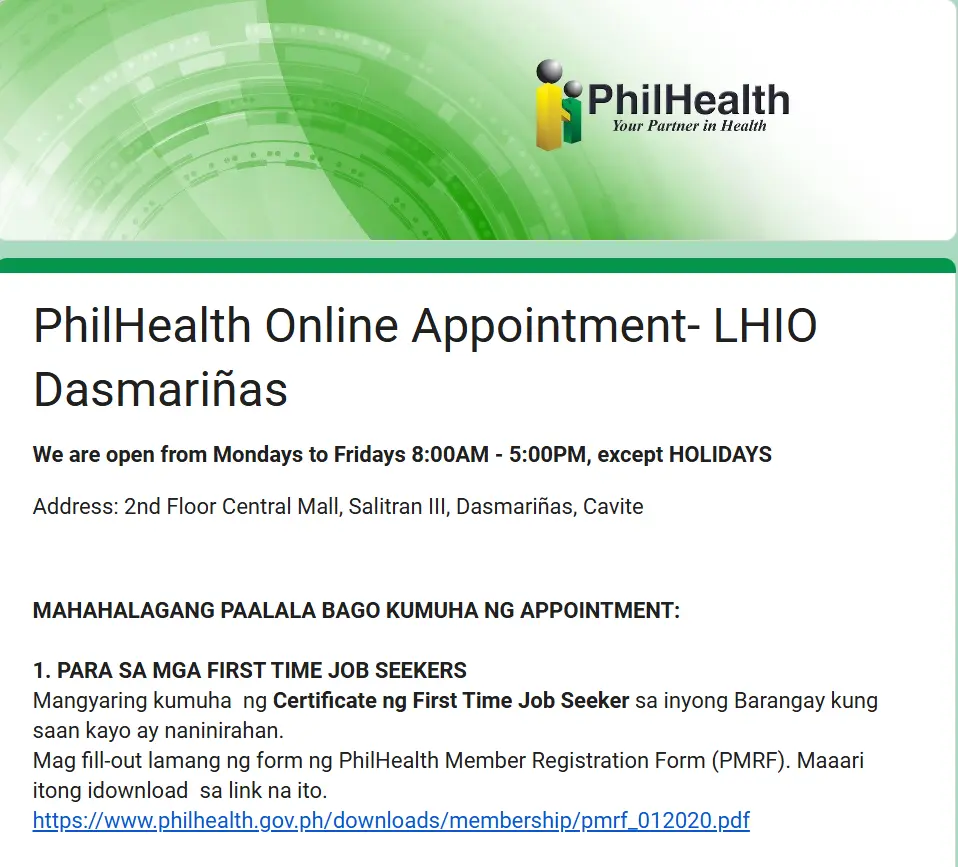
Here’s the part most people don’t expect: there is no single national booking portal that covers every PhilHealth branch in the country. Each regional office and LHIO manages its own scheduling setup, and these are often linked from the official PhilHealth website under the Online Services section, though some branches still rely on separate Google Forms or their own Facebook pages for bookings. This decentralized setup started as a way to manage crowds during the pandemic, and PhilHealth has kept versions of it in place since then.
That’s why searching “PhilHealth online appointment” sometimes leads to different results depending on which branch you’re trying to reach. Metro Manila branches, provincial LHIOs, and regional offices don’t necessarily use the same booking page. The safest approach is always to start at the official website, www.philhealth.gov.ph, and look for your specific branch’s link rather than trusting the first result that shows up on Google.
It also helps to understand where this fits into the bigger picture. PhilHealth has pushed hard toward the Member Portal and the eGovPH app for most transactions, meaning many things you used to need a branch visit for can now be done from your phone or computer. The appointment system exists specifically for the transactions that still require a person behind a counter.

Do You Even Need an Appointment? (Appointment vs. Walk-In vs. Fully Online)
Most routine PhilHealth transactions paying contributions, checking your Member Data Record (MDR), or generating a Statement of Premium Account (SPA) can be done entirely online without booking anything. An appointment is mainly needed for transactions that require document verification or a staff member’s manual review.
You can likely skip the branch entirely and use the Member Portal or eGovPH app if you need to:
You’ll usually need an in-branch appointment for:
Walk-ins are still accepted at many branches, particularly PhilHealth Express outlets found inside malls like SM and Robinsons. These express counters typically handle straightforward ID requests and simple inquiries without requiring a prior booking. If your concern is minor, it’s worth calling the branch first to ask whether a walk-in is acceptable before you go through the trouble of booking a slot.
The general rule worth remembering: if a task can be finished through your phone, do it that way first. Save the branch visit and the appointment booking for situations that genuinely need a human to review your documents.
Step-by-Step: How to Book a PhilHealth Online Appointment
The member login is what most individual users are looking for, and the process is fairly straightforward once you know where to click. Here’s how it works.

Confirm you actually need an appointment
Check the section above first. If your concern can be handled through the Member Portal, skip the appointment altogether and save yourself the trip.
Go to the official PhilHealth website
Type www.philhealth.gov.ph directly into your browser rather than clicking a link from search results or social media, since fake appointment sites do exist.

Find your branch’s Online Services or appointment section
Look for the region or LHIO nearest to you. Some branches display a direct booking link, while others point you to a Google Form or a Facebook page they use for scheduling.
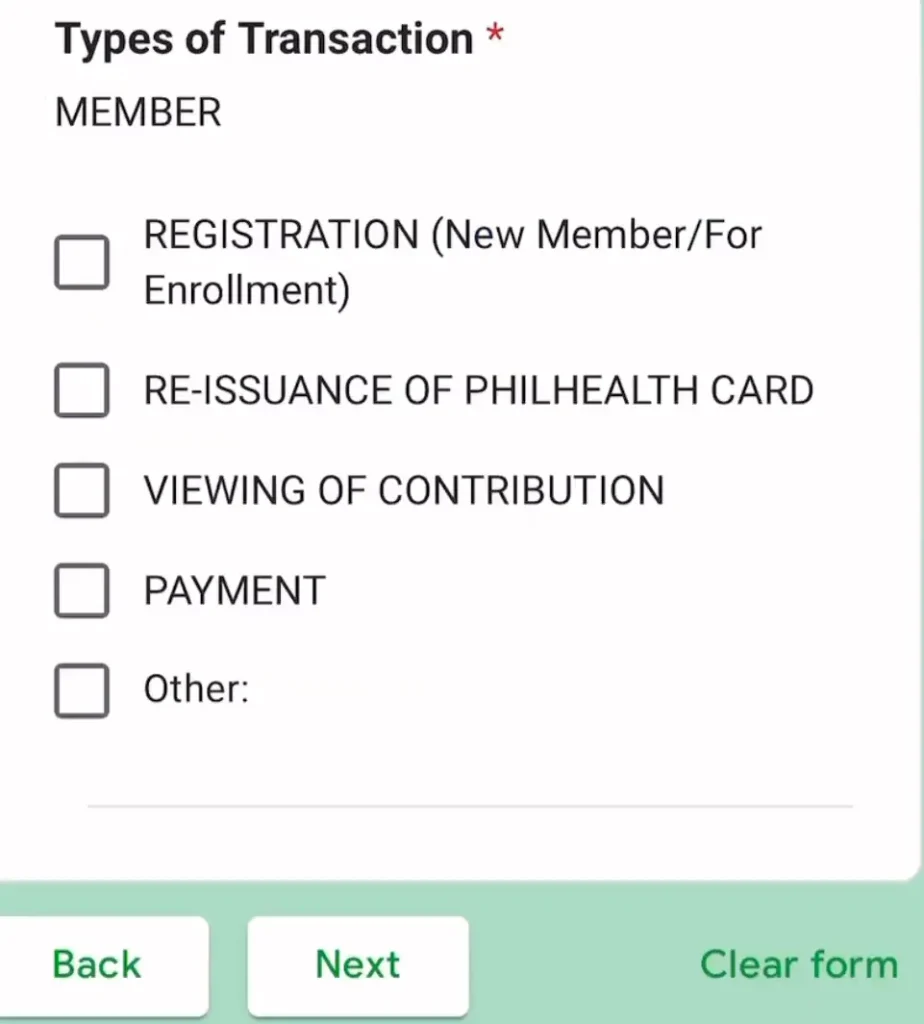
Select your transaction type carefully
Choose the exact service you need, such as ID application, dependent enrollment, or record correction. Picking the wrong category is one of the most common reasons appointments get redirected or cancelled at the branch.

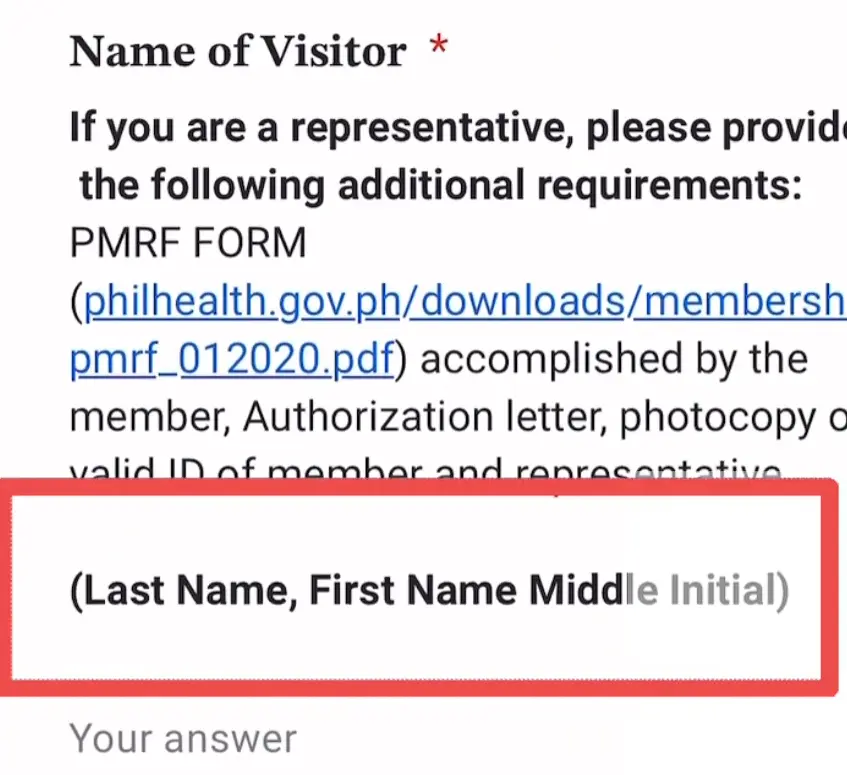
Fill in your personal information
Enter your full name, PhilHealth Identification Number (PIN) if you already have one, a working email address, and an active mobile number. Double-check the spelling of your name against your valid ID before submitting.

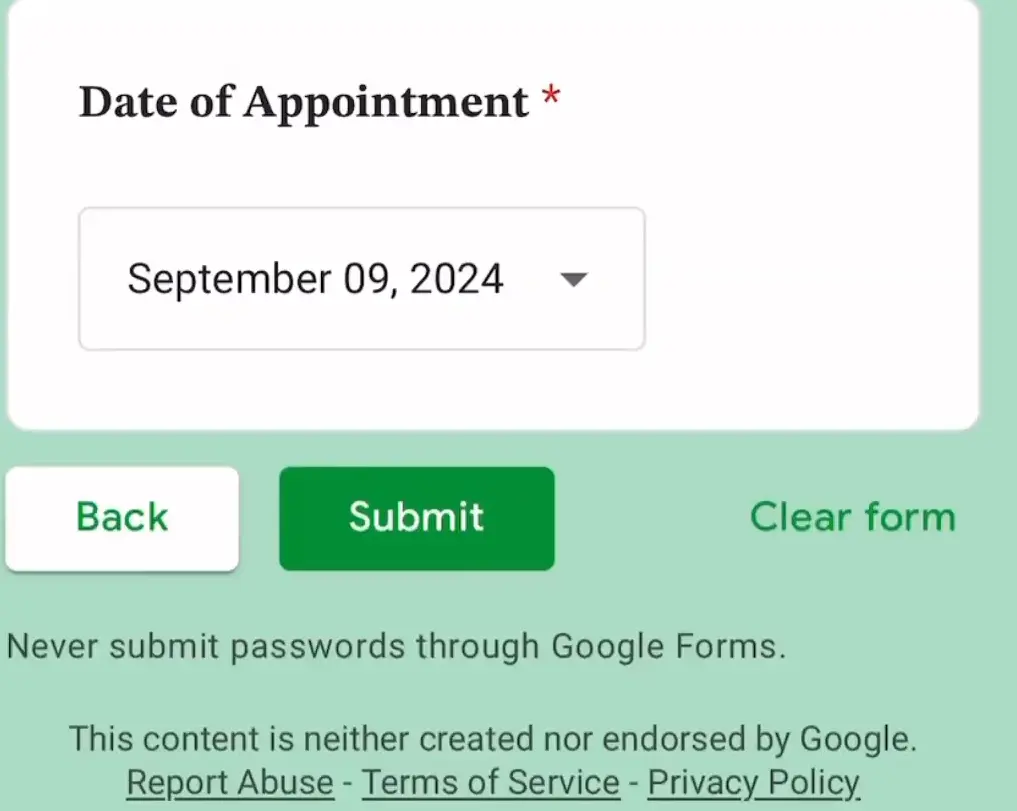
Pick your preferred date and time
Morning slots and early-week schedules tend to fill up fastest, so book as early as you can once slots open.
If your schedule is flexible, midweek afternoons often have more availability.
Review everything before submitting
A single typo in your email or contact number can mean you never receive your confirmation,
so take a moment to check every field.

Save your confirmation
You’ll typically receive a confirmation slip, email, or text message with your appointment date, time, and reference number. Screenshot it or print it, since staff will usually ask to see it when you arrive.
If your branch has no visible online appointment link at all, calling the office directly is a reasonable next step. Some smaller LHIOs still process appointments by phone, especially in provinces where the online system hasn’t been fully rolled out.
Requirements to Prepare Before Your Appointment
Bringing incomplete documents is one of the most common reasons people get turned away even after successfully booking a slot. Prepare these basics regardless of which transaction you’re booking for.
Your appointment confirmation
printed copy or a
clear screenshot
on your phone
At least one valid government-issued ID
original plus a photocopy, such as a driver’s license, passport, UMID, or the Philippine National ID
Your PhilHealth Identification Number (PIN)
if you
already
have one
PMRF (PhilHealth Member Registration Form)
filled out in advance for
registration or
record updates
Supporting documents specific to your transaction
for example, a birth certificate for adding a dependent, or a marriage certificate for updating civil status
If someone else is processing your transaction on your behalf, PhilHealth requires a signed authorization letter along with a photocopy of your valid ID and the representative’s own valid ID. Without this authorization letter, branch staff generally won’t process the transaction, no matter how legitimate the reason sounds.
It’s worth double-checking the exact document list for your specific transaction on the PhilHealth website before your appointment date, since requirements can vary slightly by transaction type and by branch.
If you’re unsure how to write one or what information it should include, follow our complete PhilHealth Authorization Letter guide before your appointment.
How Much Does It Cost? (Fees and Charges)
Booking a PhilHealth online appointment itself is completely free. You should never be asked to pay to reserve a slot.
The transaction you’re booking for may carry its own cost, though most common member transactions registration, ID issuance, record corrections, and MDR printing don’t charge a fee. What you do pay for regularly is your monthly or quarterly contribution, which is a separate matter from appointment booking.
If a website or Facebook page asks for payment just to secure your appointment slot, treat it as a red flag. This is a known scam pattern, and PhilHealth has warned members about fake booking sites that mimic the official portal to collect fees or personal information. Always verify that any site you’re using ends in philhealth.gov.ph before entering your details or making any payment.
How Long Does the Whole Process Take?
Booking the appointment itself takes about five to ten minutes online. The wait for an available slot can range from same-week to a couple of weeks depending on your branch’s demand, and the actual branch visit usually takes anywhere from 30 minutes to a couple of hours once you arrive.
High-volume branches in Metro Manila, Cavite, and Laguna tend to have the longest waits for available slots, sometimes filling up within hours of new schedules being released. Provincial branches and smaller LHIOs generally have shorter waiting periods, and some even accommodate next-day appointments.
On the actual appointment day, having a confirmed slot means you typically skip the general queue and go straight to a designated counter or window. Processing time at the counter itself depends on your transaction — a simple ID release might take fifteen minutes, while a record correction that needs supervisor approval could take longer.
Common Mistakes That Cause Delays or Cancelled Appointments
Even with a confirmed booking, small errors can undo all that preparation. Here are the mistakes that show up most often.
Selecting the wrong transaction type
Choosing “new registration” when you actually need a record correction can get your appointment redirected once you’re already at the branch, forcing you to rebook.
Using an inactive email or phone number
Confirmation messages, reminders, and rescheduling notices all go through these channels, so an old number tied to a lost SIM means missed updates.
Forgetting to bring the confirmation slip
Staff use this to verify your slot and match you to the correct counter, and without it you may be treated as a walk-in instead.
Arriving without a photocopy of your ID.
Many branches don’t have photocopying facilities on-site, and this alone can stall your transaction until you find a nearby shop.
Not double-checking your name and birthdate before submitting
Once your PIN is generated with incorrect details, fixing it later requires its own separate correction process, which ironically requires another appointment.
Taking five extra minutes to review your form before hitting submit avoids most of these problems entirely.
Common Problems and How to Fix Them
No available slots
This is the most frequent complaint, especially for busy branches. Try checking the booking page early in the morning right when new schedules typically open, or consider a midweek date instead of Mondays and Fridays, which fill up fastest. If your work or location allows it, checking a nearby branch with lighter demand can also get you in sooner.
Confirmation email or SMS never arrived
First check your spam or promotions folder, since government emails sometimes land there. If nothing shows up after a day, contact the branch directly using the phone number listed on the official PhilHealth website to verify your booking manually.
Can’t find the appointment link for your branch
PhilHealth’s website structure has changed a few times, so bookmark or note the direct link once you find it. If you’re stuck, searching your branch name together with “PhilHealth appointment” on Google, or checking the branch’s official Facebook page, usually surfaces the correct booking form.
You missed your scheduled appointment
Your slot is typically forfeited, meaning you’ll need to book a new one. If you know in advance you can’t make it, cancel through the booking portal or call the branch so someone else can use the slot, since repeated no-shows can affect your ability to book future appointments there.
You suspect a fake appointment website
If a site asks for payment to book a slot, or the URL doesn’t end in philhealth.gov.ph, don’t enter any personal information. Report it if possible and go directly to the verified official website instead.
Booking a PhilHealth Appointment Outside Metro Manila (Including Dumaguete)
Members outside the capital region, including those in Negros Oriental, Cebu, Davao, and other provincial areas, sometimes assume the appointment process works differently for them. It doesn’t, though the booking link itself will point to a regional page rather than a Metro Manila one.
For Dumaguete, the main PhilHealth office is located at the 2nd Floor, Poincare I Building, National Highway corner E.J. Blanco Drive Extension, Dumaguete City, Negros Oriental. <cite index=”19-1″>The Local Health Insurance Office in Dumaguete can be reached through the landline numbers (035) 422-3931 and (035) 225-9297.</cite> There is also a PhilHealth Express counter available inside Robinsons Place Dumaguete for members who prefer a walk-in option for simpler transactions like ID applications.
If you’re trying to book online for the Dumaguete branch or any other regional office, start at the PhilHealth website’s Online Services section and look for the Region 7 (Central Visayas) link, since that’s where Negros Oriental branches typically fall under. When in doubt, a direct call to the branch is often faster than hunting for a booking form that may not be prominently listed.
Tips for a Smooth Appointment Day
A little preparation goes a long way toward making your visit painless. Keep these habits in mind once your appointment is confirmed.
Following these small steps consistently is usually what separates a fast, uneventful visit from a frustrating one.
Frequently Asked Questions

I’m Dayon, and I run PhilHealthPH.com. I got tired of confusing, outdated instructions every time I had to deal with PhilHealth online, so I started writing the guides I wished existed — clear, current, and focused on actually getting the task done. Everything here is checked against PhilHealth’s official site and updated whenever their process changes.